


SpicyBox: AI Video Generator
4.57.00 Reviews
App Specs
- Version
- 1.0.1
- Updated On
- License
- Free
- Downloads
- 10,000+
- Developer
- Iqra Shahzadi
- Categories
- Photography
- Platform
- Android
Screenshots



 Analysis by AppCompare
On a shared phone or tablet, a creative app can quickly become a household question: who is using it, what are they making, and where will the finished work be seen? I would treat SpicyBox: AI Video Generator as a personal creative tool rather than a family activity. Its focus is AI-made sensual imagery, so it calls for more thought about privacy and audience than a general-purpose photo editor.
A shared device needs clear boundaries
If several people use the same device, I’d agree on a simple rule before opening the app: each person should use it only with permission from the device owner, and no one should browse another person’s drafts or creations without asking. A shared login or an unlocked screen can blur those lines, especially when the content is intended to be personal. I would also avoid handing the device to a child and assuming the app’s age label makes every image appropriate for them.
That distinction matters because a household device is not the same as a household account. I would keep creative sessions separate where possible, close the app when finished, and check what appears in the device’s recent-app view before passing it along. Those are ordinary privacy habits, not special controls provided by the app, and they are worth following whenever an image-making tool may produce intimate-looking results.
Agree on the purpose before creating
Coordination can be as simple as deciding whether a project is private experimentation or something intended to share. If two adults are exploring visual ideas together, talking through the desired mood and intended audience first can prevent awkward surprises. If one person wants to post a result and another prefers to keep it private, the safest choice is to honor the more cautious preference.
I would be especially careful with any image that resembles a real person. AI-generated content can still be mistaken for an authentic photo or video, and a sensual style makes that misunderstanding more consequential. Before sharing, consider whether viewers could identify someone, whether that person has agreed to the depiction, and whether the post could be taken out of context. When in doubt, keep the result private or choose a clearly fictional concept.
Age labels and trust at home
SpicyBox is a free photography app from developer Iqra Shahzadi, with a 4.5 average from around 77 ratings and over 10,000 installs. It is marked Everyone, but I would not treat that label as a substitute for a parent’s own judgment about sensual AI content. Age classifications are useful context; they do not tell a family whether a particular use fits its values or a child’s maturity.
The app is listed as version 1.0.1 and supports Android 8.0 or later. That makes compatibility worth checking before setting it up on an older household device. I’d also make sure the person using it understands basic consent and sharing boundaries; a quick conversation is more useful than assuming a store age label settles every question.
Worth Reading Before You Choose

EA SPORTS FC Mobile 26 Is a Bigger Football Game, but It Takes Time

Flipboard Shows What News Apps Must Do Beyond the Feed

Switching to Android Auto Means Rethinking Your Driving Routine

Google Calendar Makes a Crowded Week Easier to Manage

Ludo King Makes the Most of the Minutes Between Plans

Baby Panda World Brings Quick Play to Modern Phones, but Its Game Library Feels Busy
Who may want a different tool
This app is a better fit for adults who want to explore stylized, sensual AI visuals than for someone seeking a neutral family photo editor, a professional retouching suite, or a conventional camera workflow. For everyday pictures of children, family events, or travel, I’d choose a standard photo app that is designed around ordinary editing and keeps the purpose clear. For precise control over a polished commercial project, desktop editing software is usually a better match.
It is also not my first pick for a household that shares one device without separate user boundaries, or for anyone uncomfortable with suggestive generated imagery. A free download can still involve a personal trade-off: consider whether the app’s subject matter suits your intended use before investing time in a project. If your goal is simply to make a playful clip for friends, a general-purpose editor may be easier to explain and safer to pass around.
Unpacking the Magic of SpicyBox
So, what exactly does SpicyBox bring to the table? Well, imagine being able to craft stunning videos with just a few taps. The app leverages the power of AI to help you whip up videos that look like they’ve been professionally edited. Whether you’re an aspiring YouTuber, a social media enthusiast, or someone who just loves sharing creative content, this app has something for you.
Getting Started: Easy Peasy
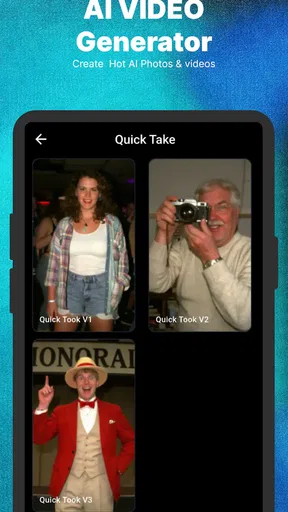
Jumping into SpicyBox is a breeze. The user interface is sleek and intuitive, which means you won’t spend ages figuring things out. Once you download and open the app, you’re greeted with a clean dashboard that guides you through the video creation process. It’s as simple as selecting your video clips, choosing a style, and letting the AI work its magic. Seriously, it's that straightforward.
For a low-pressure first session, I’d begin with one short idea rather than trying to build a polished sequence all at once. Save a copy of any source material before testing a style, then compare the result with the original. That makes it easier to judge whether the transformation suits the subject, and it avoids treating an automated result as a replacement for your own creative choices. If you plan to share, review the finished clip from beginning to end first; a quick preview can catch an image or tone that does not fit the audience you had in mind.
Features That Make You Go Wow
Here’s where things get spicy. The app offers a variety of templates and editing tools that cater to different video styles. Want a cinematic feel? Or maybe something more casual and fun? You got it. The AI is smart enough to adjust lighting, transitions, and even suggest background music that fits the mood of your video. And if you’re worried about quality, don’t be. The videos come out looking sharp and professional.
SpicyBox also boasts some cool features like text overlays, filters, and even the ability to adjust the speed of your clips. This means you can get really creative and personalize your videos to match your vision. Plus, the app regularly updates with new templates and features, keeping your content fresh and exciting.
For a more deliberate result, I’d treat the template as a starting point and then make one change at a time: first the visual style, then any text, then the clip speed. Changing everything together makes it harder to tell what improved the edit. Text is also worth checking at phone size, since a phrase that looks readable while editing can become hard to see once the video is viewed on a smaller screen. And when the suggested music competes with the image or message, a simpler sound choice—or no added music—can make the finished piece feel more intentional.
Who’s It For?
Honestly, anyone can benefit from this app. Whether you’re a newbie or a seasoned content creator, SpicyBox has something to offer. It’s perfect for quick projects or even more detailed edits, depending on what you’re looking to achieve. And for those of you running social media pages or businesses, it’s a fantastic tool to spice up your content and engage your audience.
I’d be more selective about the word “anyone,” though: the sensual focus makes the audience and subject matter central to deciding whether it is a good fit. An adult creator testing a visual concept for a private mood board may find the format useful; a small business that needs consistent, brand-safe product footage may prefer a conventional editor with more predictable control. The same distinction applies to social posts. A quick AI treatment can help explore an idea, but it should not be mistaken for a dependable workflow when accuracy, recognizable details, or a carefully controlled look matters.
A realistic use might be an adult who has a visual concept in mind after work, wants to try a short clip without learning a complex editing program, and keeps the first result private while deciding if the style works. That is where a compact AI-oriented tool can be convenient. If the concept turns into a public post, I’d take another pass for consent, misleading realism, text legibility, and whether the final tone suits the platform and viewers.
My Personal Take
Having tinkered with a bunch of video editing apps, I have to say SpicyBox stands out for its simplicity and effectiveness. Sure, it might not replace high-end editing software for professional projects, but for everyday use, it’s a gem. I love how it takes the stress out of video creation and lets you focus on the fun part—being creative.
The main trade-off I see is between speed and control. Templates and automated adjustments can get someone past a blank timeline, but they may also steer a project toward a familiar, preset look. If exact timing, detailed layer work, or repeatable results are central to your project, a more manual editor gives you a better chance to shape every step. I’d use SpicyBox to explore an idea or make a casual piece, then switch tools if the result needs precise finishing.
People often want to know whether an AI video app is suitable for private use, whether it can replace a full editor, and whether its output is ready to post. My practical answer is to decide the intended audience before creating, use it for quick visual experimentation rather than assuming it covers every editing need, and inspect the complete result before sharing. The app’s creative convenience is most useful when you remain responsible for the final choices.
One thing I really appreciate is the community aspect. The app allows you to share your creations with other users and get inspired by their work. It’s a nice touch that adds a social element to the app, making the whole experience more engaging.
That social element is also a reason to pause before posting. I’d avoid sharing anything that reveals a private person, a home setting, or details someone would not want circulated beyond the original audience. A result that feels harmless among friends can travel further once it leaves the device. If you are coordinating a project with another person, agree on who can share it and where before using any community-facing option.
The Bottom Line
In a nutshell, if you’re looking to dip your toes into video creation or want to streamline your content process, SpicyBox: AI Video Generator is worth checking out. It’s user-friendly, packed with features, and above all, makes video editing fun and accessible. So go ahead, give it a whirl, and see how it can transform your videos!
For a household, I’d call it a personal-use choice rather than a shared family staple. It may suit adults who want an approachable way to try sensual AI visuals and are comfortable setting clear boundaries around the device and anything they share. I would skip it for a child-focused device, a family photo workflow, or a project where precise professional control is essential. Used thoughtfully, it can make experimentation less intimidating; the best results still depend on choosing an appropriate subject, checking the finished clip, and deciding carefully who should see it.
Pros
- Generates high-quality AI videos quickly.
- User-friendly interface for easy navigation.
- Wide range of customizable video templates.
- Supports multiple languages for global users.
- Includes advanced editing tools for precision.
Cons
- Requires a stable internet connection.
- Limited free version features.
- Occasional glitches in video rendering.
- Subscription can be expensive for some.
- High storage usage on devices.
FAQs for SpicyBox: AI Video Generator
What is SpicyBox: AI Video Generator?
SpicyBox is an innovative app that allows users to generate videos using advanced AI technology. It offers a variety of templates and customization options to create engaging and dynamic content quickly and easily. Users can leverage AI to enhance video quality and apply creative effects without needing extensive video editing skills.
Is SpicyBox suitable for beginners?
Yes, SpicyBox is designed with user-friendliness in mind, making it ideal for beginners. The app provides intuitive navigation and straightforward controls, allowing users with no prior video editing experience to create professional-looking videos. Tutorials and tips are also available within the app to guide new users through the process.
What features does SpicyBox offer?
SpicyBox offers a wide range of features, including AI-driven video enhancements, customizable templates, and a variety of effects and filters. Users can add text, music, and transitions to their videos, and the app supports multiple video formats. Advanced tools enable users to fine-tune their videos to achieve the desired look and feel.
Is SpicyBox free to use?
SpicyBox offers a free version with basic features, allowing users to test its capabilities before committing to a purchase. For access to premium features, such as additional templates and advanced editing tools, users can opt for a subscription plan. The app provides various pricing options to suit different needs and budgets.
What are the system requirements for SpicyBox?
SpicyBox is compatible with both Android and iOS devices. For optimal performance, it is recommended to have a device with at least 4GB of RAM and the latest operating system updates. Regular updates ensure the app runs smoothly and incorporates the latest features and improvements. Check the app store for specific compatibility requirements before downloading.


